Streaming services, cloud storage, fitness memberships, news sites, software tools, and mobile apps can all create recurring charges. Because each payment may seem small, it is easy to overlook subscriptions you rarely use.
A $9.99 monthly subscription costs about $120 a year. Five subscriptions at that price would cost nearly $600 annually.
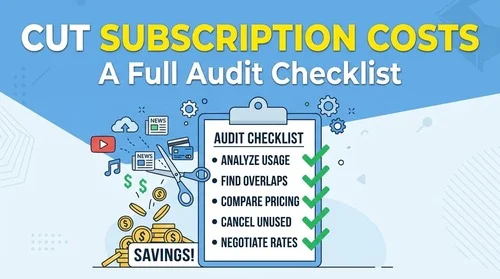
A subscription audit helps you identify recurring payments, decide which services you still use, and cancel the ones that no longer belong in your budget.

Interactive Subscription Savings Calculator
Use the calculator below to estimate how much you could save by removing subscriptions you no longer use. Enter your approximate monthly subscription costs and compare the potential savings over one to five years.
Where Hidden Subscriptions Can Be Found
Recurring charges are not always managed from the same place where you originally noticed the service. Check your bank and card statements alongside the subscription lists on your devices and payment accounts.
Common Sources of Forgotten Subscriptions
- App Stores: Mobile apps can have recurring subscriptions for fitness programs, photo tools, productivity services, games, and other features.
- Free Trials: A trial can automatically become a paid subscription when the trial period ends if you do not cancel according to the provider’s terms.
- Annual Plans: Annual subscriptions can be easier to overlook because the charge does not appear every month.
- Payment Services: Services such as PayPal can have recurring payment agreements that should be reviewed separately from your card or bank transactions.
- Streaming Add-Ons: Premium channels, sports packages, additional storage, or other add-ons can remain active even after you stop using them.
Step-by-Step Subscription Audit
1. Review 90 Days of Bank and Card Statements
Start with your bank accounts and credit cards.
Review at least three months of transactions and look for:
- Repeated charges from the same merchant
- Similar amounts appearing each month
- Quarterly or annual charges
- Merchants you no longer recognize
- Small recurring payments you may have forgotten
Three months is a useful starting point, but check a longer period if you are specifically looking for annual subscriptions.
Do not assume an unfamiliar merchant is fraudulent simply because you do not recognize the name on your statement. The billing descriptor can differ from the service’s consumer-facing name. Search the merchant name and check your email receipts before disputing a charge.
2. Check Your Apple or Google Subscriptions
Mobile-billed subscriptions may not be obvious when reviewing the service’s website.
iPhone or iPad:
Go to Settings → Your Name → Subscriptions.
Android:
Open Google Play → Profile icon → Payments & subscriptions → Subscriptions.
Review active subscriptions, renewal dates, and prices. Cancel services you no longer want according to the cancellation options provided.
3. Review Recurring Payments in Payment Services
If you use PayPal or another digital payment service, check whether you have active automatic payment agreements.
For example, PayPal provides an area where users can review merchants authorized for automatic payments.
Do not cancel an agreement solely because you do not recognize the merchant name. First confirm what the payment relates to and whether the subscription is still active.
4. Search Your Email for Subscription Receipts
Your inbox can reveal subscriptions that are difficult to identify from a bank statement.
Search for terms such as:
- “subscription”
- “renewal”
- “your payment”
- “trial”
- “membership”
- “receipt”
- “billing”
- “renewed”
Also search for phrases such as “next billing date” or “payment confirmation.”
This can help connect an unfamiliar billing descriptor with the actual service.
5. Decide What to Keep, Cancel, or Review
Create three simple categories:
| Category | Action |
| Use regularly | Keep it |
| Rarely use | Consider cancelling |
| Do not recognize | Investigate before taking action |
For services you rarely use, compare the annual cost with how often you actually use them.
For example, if a $15 monthly service costs $180 a year and you use it twice, cancelling it could free up $180 for other expenses.
6. Cancel Through the Correct Provider
Where you cancel depends on where you purchased the subscription.
A subscription purchased through an app store may need to be cancelled through Apple or Google. A subscription purchased directly from a company’s website may need to be cancelled through that company’s account settings.
After cancelling, save the confirmation email or take a screenshot showing the cancellation and effective date.
Do not assume that deleting an app automatically cancels its subscription.
Comparison: Subscription Audit Methods
| Audit Method | Typical Time | What It Finds | Limitation |
| Bank and Card Review | 15–30 minutes | Recurring charges across accounts | Annual charges may require a longer review period |
| App Store Audit | 5 minutes | Apple or Google billed subscriptions | Does not show subscriptions billed directly by websites |
| Payment-Service Review | 5–10 minutes | Automatic payment agreements | Covers only that payment service |
| Email Search | 5–15 minutes | Receipts, trials, and renewal notices | Depends on having access to older emails |
| Subscription-Management App | Varies | May identify recurring payments automatically | Features, fees, and account-access requirements vary |
3 Proactive Rules to Prevent Future Subscription Creep
1. Set a Reminder for Every Free Trial
Add a calendar reminder a few days before the trial ends. This gives you time to decide whether the service is worth paying for.
2. Cancel Services You Already Know You Won’t Keep
If you have tested a service and decided not to continue, cancel it promptly. Check the provider’s terms to confirm when access ends and whether cancellation stops the next renewal.
3. Run a Quarterly Subscription Audit
Set a recurring calendar reminder every three months to review your bank and card statements, app-store subscriptions, payment-service agreements, and upcoming annual renewals.
Final Thoughts
Subscription costs are easy to overlook when they arrive as small, recurring charges. A short review every few months helps you catch services you no longer use before they continue renewing.
Keep the subscriptions that provide clear value, cancel the ones you no longer need, and keep a record of important renewal dates. A 15-minute review can give you a much clearer picture of where your recurring spending goes.
The information provided on this blog is not intended to be medical advice and should not be relied upon as such.If you have any medical concerns, please consult with a qualified healthcare professional. We are not responsible for any harm or injury caused by reliance on the information provided.